

Procurando como assistir ao Univer Vídeo em sua TV? Este post é o guia definitivo que você procurava.
Você vai aprender a assistir o Univer em sua TV tendo:
- SmartTV;
- Android TV;
- Chromecast;
- Fire TV Stick;
- Apple TV.
Smart TV
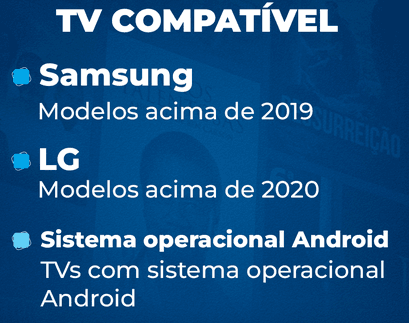
Podendo ser um aparelho Samsung (com modelos acima de 2019), LG (com modelos acima de 2020) ou com sistema operacional Android, você consegue baixar o aplicativo da Univer Vídeo na sua Smart TV.
Se a sua TV é compatível para a atualização (clique aqui para ver a lista atualizada), você precisará acessar a loja de aplicativos da sua Smart TV, pesquisar por “Univer Vídeo” e fazer o download.
Com o aplicativo instalado, você pode abrir, fazer o login em sua conta do Univer Vídeo e aproveitar.
Android TV
Se você utiliza o Android TV e quer baixar o aplicativo do Univer Vídeo, siga esse passo a passo muito fácil, e você conseguirá baixar rapidamente.
- Dentro do Android TV, procure nos aplicativos pela Play Store;
- Na Play Store, você irá na lupa de busca e pesquisar por “Univer Vídeo”;
- Após encontrar, selecione para fazer o download;
- Após instalar, você irá em “abrir” e pronto. O Univer Vídeo está em mãos.
Fire TV Stick
O Fire TV Stick é um aparelho que transforma qualquer TV em Smart, assim, você pode assistir ao Univer Vídeo na sua televisão com total comodidade.
É importante ter em mente que, para baixar aplicativos no Fire TV Stick Amazon, você precisa ter registrado o seu CPF.
Para registrar, basta:
- Ir em “sua conta”;
- Selecione “configurações de login e segurança”;
- Inclua seu CPF;
Com o CPF incluso, você poderá baixar o aplicativo do Univer Vídeo com os três passos simples:
- Abra a Amazon store, dentro do dispositivo;
- Busque por “Univer Vídeo” e faça o download;
- Com o aplicativo instalado, você já pode aproveitar o Univer Vídeo.
Clique aqui e adquira o seu Fire TV Stick.
Google Chromecast
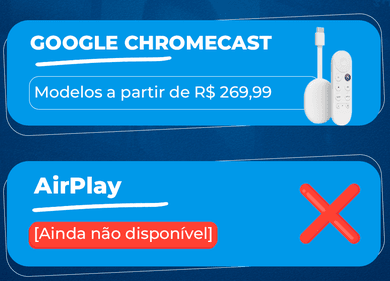
Google Chromecast é um aparelho de streaming que transforma qualquer televisor em uma smart TV, possibilitando que você possa baixar aplicativos e assistir pela TV, como o Univer Vídeo, por exemplo.
Para assistir ao Univer Vídeo com seu Chormecast, é muito simples. Veja só:
- Conecte seu Chromecast em uma saída HDMI da TV;
- Configure o acesso ao Wifi;
- Espelho do seu celular para a TV e pronto, já poderá assistir ao Univer Vídeo na TV.
Clique aqui e adquira o seu Chromecast
Apple TV
Já os que gostam da Apple TV, também temos espaço para vocês! E com um passo a passo bem parecido com a Smart TV.
- Abra a loja de aplicativos App Store;
- Procure “Univer Vídeo” na busca do aplicativo;
- Aperte o botão “Obter” para fazer download do Univer Vídeo;
- Após instalado, basta você abrir e já terá o acesso ao Univer Vídeo.
Clique aqui e adquira um aparelho Apple TV.
Eu não tenho conta no Univer Vídeo ainda. O que fazer?
Caso você queira assistir ao melhor do conteúdo que faz bem, com mais de 10 mil horas de filmes, séries, novelas, podcasts, palestras e reuniões, precisará de uma assinatura.
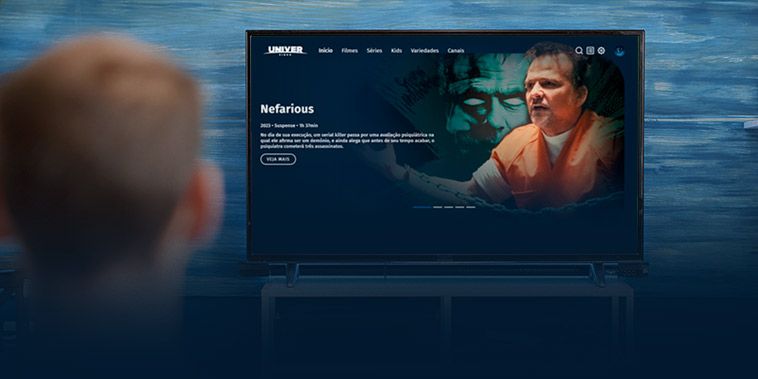
O primeiro passo para criar o cadastro é colocar o e-mail que você utiliza e a senha que irá usar para entrar no Univer Vídeo. No segundo passo coloque seu nome e sobrenome.
No terceiro passo, você consegue visualizar as opções de planos de assinatura e escolherá a que fizer mais sentido para você e sua família.
Após escolher o plano, irá para o quarto passo, que é escolher a forma de pagamento e realizá-lo. Atualmente temos a função de pagamento via cartão de crédito e boleto.
Caso sua escolha seja o cartão de crédito, você colocará os dados do seu cartão ali mesmo nas lacunas que o aplicativo te entrega.
Se a sua opção for pelo boleto, colocará os dados solicitados e poderá gerar o código do boleto para pagamento.
Com o pagamento efetuado, você será direcionado para a quinta e última tela, significando que o plano já está ativo e você já pode assistir ao Univer Vídeo.
Clique aqui e faça a sua assinatura.
AINDA COM DÚVIDAS?
Entre em contato conosco pelo WhatsApp (11) 5555-1383 ou no chat de atendimento no univervideo.com.
Univer Vídeo, conteúdo que faz bem.