

O novo aplicativo do Univer Vídeo chegou com tudo. Funcionalidades que nossos usuários pediram por muito tempo foram atendidas.
E, com ele, é natural que surja a dúvida: "Como instalar o novo aplicativo do Univer Vídeo?"
Então, fique por aqui, porque este texto é sobre isso e muito mais.

Abaixo, vamos recordar o que mudou, entre tantas novidades dentro do novo aplicativo do Univer Vídeo.
CONTINUE ASSISTINDO
Para você saber exatamente onde parou e não precisar ficar gravando. Basta apertar no episódio que está e lá estará o recado para você escolher a opção de continuar assistindo ou começar do início.
OPÇÃO “MINHA LISTA”
Sabe aquele filme ou série que você amou, mas não tem tempo para assistir naquele momento? A opção “minha lista” veio para te ajudar, ao invés de cair no esquecimento, você pode deixar guardado para assistir depois.
PERFIL PERSONALIZADO
Você divide o Univer Vídeo com a família, mas quer ter seu espacinho pessoal? Para isso o perfil personalizado chegou. Agora, é cada um no seu quadrado.
CONTROLE PARENTAL COM SENHA
Mesmo com a nossa rígida curadoria, os papais podem preferir privar os filhos de assistirem certos conteúdos e nós entendemos isso.
O controle parental com senha do novo aplicativo do Univer Vídeo vai ajudar ainda mais no controle pessoal de cada família.
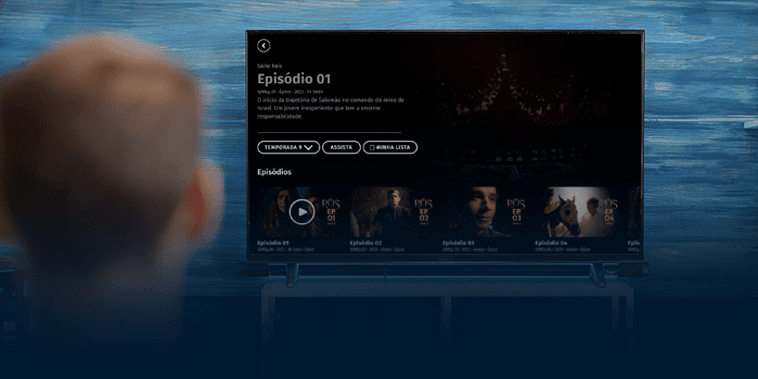
DIVISÃO POR TEMPORADA BEM CATEGORIZADA
Chega de ficar procurando cada temporada da série separadamente. Agora você consegue abrir a série e dentro dela haverá todas as temporadas categorizadas.
Como instalar o novo aplicativo do Univer Vídeo?
Como bônus, o novo aplicativo do Univer Vídeo está com um layout completamente diferente e moderno.
Mas é claro que, tudo que é novo pode trazer dúvidas no início, então vou te ensinar a como e onde instalar o novo aplicativo do Univer Vídeo.

NOVO APLICATIVO DO UNIVER VÍDEO NA APPLE STORE
No IOS, para instalar o Univer Vídeo basta:
- Ir na loja de aplicativos “Apple Store”;
- Buscar por “Univer Vídeo”;
- Fazer o download do novo aplicativo do Univer Vídeo;
- Após download feito, você já pode entrar e fazer o login.
NOVO APLICATIVO DO UNIVER VÍDEO NO GOOGLE PLAY
No Android, para instalar o Univer Vídeo basta:
Ir na loja de aplicativos “Google play”;
Buscar por “Univer Vídeo”;
Fazer o download do novo aplicativo do Univer Vídeo;
Após download feito, você já pode entrar e fazer o login.
Simples, não é? O Univer Vídeo te facilita ao máximo, para você assistir tranquilamente ao melhor conteúdo que faz bem.
E, falando em conteúdo que faz bem, aqui vão algumas dicas do que assistir, após baixar o novo aplicativo do Univer Vídeo:
- Reis;
- Meditação da Palavra;
- Nefarious;
- A Estrela de Belém;
- Quando Chama o Coração;
- Lar Doce Lar… Ou Não.
Caso você não tenha assinatura do Univer Vídeo, clique aqui e conheça nossos planos que têm assinatura mensal, semestral ou anual.