
A forma mais fácil de saber se a sua televisão é compatível com o Univer Vídeo, é buscando na loja de aplicativos da sua TV. Assim, se ele aparecer, significa que você poderá assistir aos conteúdos em seu aparelho.
TUTORIAL SAMSUNG
Para verificar se é possível baixar o aplicativo em sua TV Samsung, você precisará ir até o menu "Apps" e procurar pelo app do Univer Vídeo.
TUTORIAL LG
Para verificar se é possível baixar o aplicativo em sua TV, você precisará ir até a LG Content Store e procurar pelo app do Univer Vídeo.
Mas, ainda assim, disponibilizamos os modelos que permanecem compatíveis com o Univer Vídeo a seguir:
TELEVISORES SAMSUNG
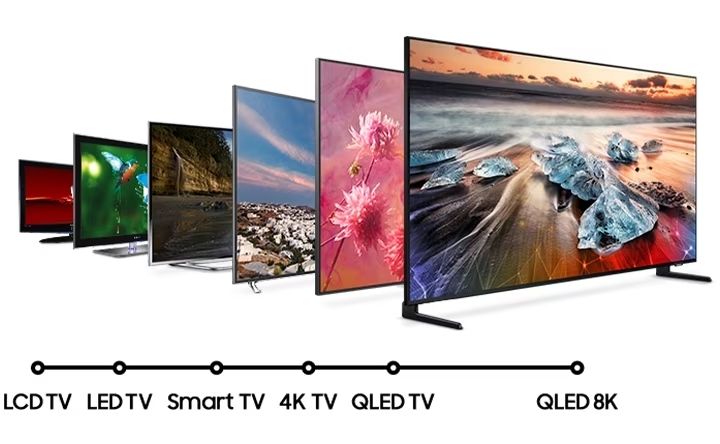
Modelos Samsung compatíveis com o Univer Vídeo:
ANO
—
Modelos Novos
2023 —
MCWS1, QCQ800, QCQ900, G75NC, G85NC, G95SC, QCQ700, S90PC, LS03C QCQ80, QCQ80D, QCQ80TL, QCQ83, QCQ85, QCQ85D, QCQ85TL, QCQ88, QCQ8X, QCQ90, QCQ90D, QCQ90TL, QCQ95, QCQ95D, QCQ95TL, QCQ9X, QCQS90, QCQS90D, QCQS90TL, QCQS95, QCQS95D, QCQS95TL, QCQS9X, M70C,M80C,QCQ70, QAQ70, QAQ7A, QAQ7D, QCQ70D_NM2, QCQ70_NM2, QCQ7X_NM2, QTQ70, M50C,QCQ60, LSP3C, UCU7000, UCU8000TL_PML, UCU8000_PML, UCU800M_PML, UCU80MD_PML, UCU8000
2022 —
QBQ900, QBQ850, QBQ800, QBQ100, MBWS1, G97NB, QBQ700, G85NB, G75NB, G95NB, LS04B, LS03B, QBQ75, QBQS95, QBQS90,QBQD90, QBQ9X, QBQ9D, QBQ95, QBQ90S, QBQ90, QBQ8D, QBQ85D, QBQ85, QBQ83, QBQ80, QBQ7X, QBQ70, QBQX3, LS01B, LS05B, G65B, G70B, G8QNB, M80B, G65B, G70B, G70NC, G85SB, LS01B_ML, LS05B_ML, QBQ70_ML, QBQ7X_ML, QBQ80_ML, QBQ83_ML, QBQ85D_ML, QBQ85_ML, QBQ8D_ML, QBQ90_ML, QBQ9D_ML, QBQ9X_ML QAQ70, QAQ7D, QAQ90, QBQ6D, QBQ63, QBQ60_DPP, QBQ60, M70BO, M70B, M50B, UAU8000_L, QAQ60_K, UAU850D_K65, UAU8000_K65, UAU8000_K, LS03BS, UBU7000, UBU8000, LSP3B, UBU8000_X
2021 —
QAQ9X, QAQ9D, QAQ95, QAQ90_NS, QAQ90, QAQ8D, QAQ85_NS, QAQ85D, QAQ85, QAQ80_NS, QAQ80, QAQ7D, QAQ70_NS, QAQ70, LST5A, QAQ7A, LS03A_NS, LS03AP, LS03A, LS03APD, LS03AD, QAQ900, QAQ850, QAQ800, QAQ700_P, MAWS1, QAQ700, QAQ700_S, UAU9070, UAU9000, QAQ6D, QAQ60, UAU850D, UAU8000, LS05AL, QAQ6D_K, QAQ60_K, QAQ50_K, UAUE60A, UAU7500, UAU7000, UAUE70A, UAU850D_K, UAU8000_K, UAU7700, LSP3, BEA_HB, KTSU2EL_ATM, KTSU2EL_HKC, KTSU2EL_HKC, KTSU2EL_REF, KTSU2EL_TPO, KTSU2EL_TPO
ANO
—
Modelos Antigos
2020 —
QTQ800, QTQ800_NS, QTQ850, QTQ900, QTQ950, QTQ950_NS, LSR9, LST7T, QTQ70, QTQ70_NS, QTQ72, QTQ7D, QTQ7X, QTQ80, QTQ80_NS, QTQ8D, QTQ8E, QTQ90, QTQ90_NS, QTQ95, QTQ95_NS, LS05T, LS03T, LS03T_NS, LS01T, LS01T_NS, MTWS1, QTQ60, QTQ62, QTQ6D, QTQ6E, QTQ6X, UTU8500, UTU850D, UTU8510, UTU8570, UTU85A0, QTQ6AC, QTQ6SC, QTQ6XC, UTU8000, UTU800D, UTU8200, UTU8300, UTU8400, LS03TS, UTU7000, UTU700D, UTU7090, UT4310, UT4500, UT4700, UT5310, UT5500, UT5770, UT4300, UT4400, UT5300, UT430E, UT530E
2019 —
QRQ900B, QRQ90, QRQ85_OC, QRQ80_OC, QRQ80, QRQ75S, QRQ75, QRQ70, QRQ6X, QRQ69, QRQ65A, QRQ60, LS03R, LS05R, LS01R, URU800D, URU8000, MLS07R, QRQ50S, QRQ50, URU7800, URU7700, URU74A0, URU7470, URU7450, URU7410, URU740D, URU7400, URU730D, URU7300, URU710D, URU7100,URU7790,URU77FA, URU7000, URU6900, URUF58T, RUF58T, UR6000, UR5500, UR4500
###
TELEVISORES LG
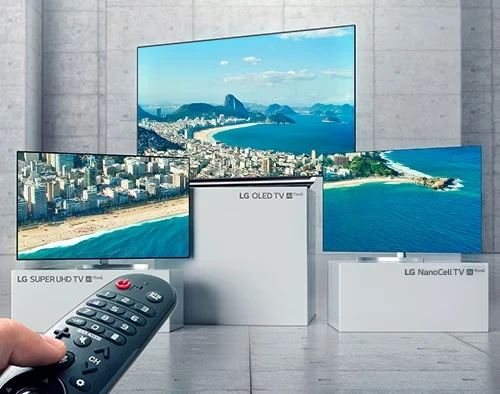
Modelos já compatíveis com o Univer Vídeo:
ANO
—
MODELO
2023 —
webOSTV 23, webOSTV 24
2022 —
webOSTV 7.0
2021 —
webOSTV 6.0
2020 —
webOSTV 5.0
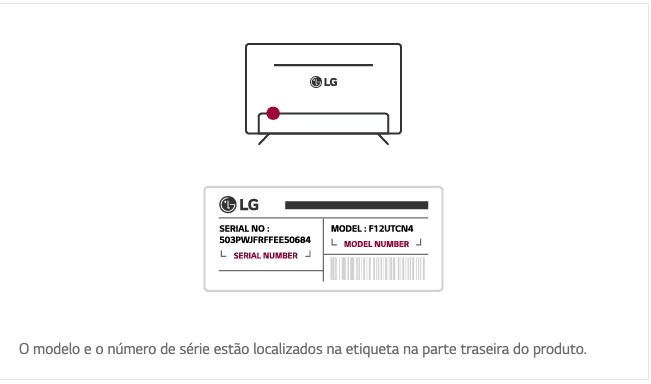
Como descobrir o modelo da minha TV?
Normalmente, as televisões possuem um adesivo na parte de trás do aparelho. Nele, é possível que você identifique qual é o seu modelo.

Para as televisões com sistema operacional Google TV, você pode baixar, normalmente, o novo aplicativo diretamente na Play Store de sua TV.
Minha televisão não está na lista. E agora?
Não encontrou sua televisão? Fique tranquilo. Ainda é possível assistir ao Univer Vídeo pela sua televisão.
Se a sua televisão possui um sistema operacional mais antigo, você precisará de um aparelho de streaming como Chromecast, Fire TV Stick, Apple TV ou MI Box. Assim, você poderá baixar o aplicativo e assistir em seu aparelho.
Mas salientamos que nosso time de especialistas trabalha, diariamente, buscando melhorar nosso aplicativo, para torná-lo ainda mais acessível a todos os modelos de televisão, das mais recentes às mais antigas.
Aviso importante
No momento, os aparelhos das marcas LG e Samsung suportam o aplicativo do Univer Vídeo apenas no Brasil. Todas as outras marcas e seus respectivos modelos possuem disponibilidade mundial.
Ressaltamos que seguimos com nosso time de desenvolvedores trabalhando para disponibilizar o app em todos os países onde há assinantes do Univer.
Ainda ficou alguma dúvida?
Nosso time de especialistas está à disposição, por meio dos nossos canais oficiais, que são eles:
WhatsApp Facebook Instagram E-mail: atendimento@univervideo.com Telefone: (11) 4950-2232
Nosso horário de atendimento é de Segunda a sábado, 8h às 20h, exceto feriados.